
Try Any Hair Color Risk-Free
See yourself with different hair colors before making the commitment. Our AI applies colors naturally and realistically, respecting your hair texture and lighting.
- Free to try
- No download
- No account required
See the Results
Real transformations showing different hair colors applied with AI precision.

Change Hair Color to Black

Change Hair Color to Blonde

All Hair Styles
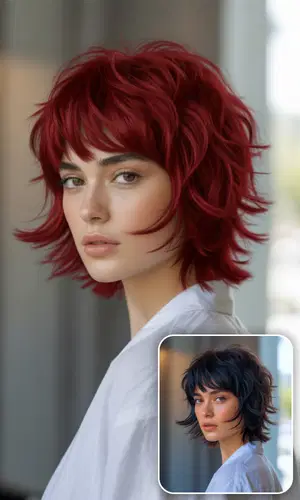
Change Hair Color to Red

Hair Color to Brunette

Classic Jet Black Hair
See how jet black or soft dark hair would look with your skin tone. The AI matches the color to your natural lighting and complexion, so you get a realistic preview before committing.
Try Black Hair
Switch to Rich Brunette Shades
From chocolate brown to espresso dark, see how different brunette tones look against your features. The AI preserves your hair texture and keeps the color looking natural at different lighting angles.
Try Brunette Hair
Transform to Beautiful Blonde Hair
Preview platinum, honey, ash, or warm golden blonde on your own photo. Blonde is one of the hardest colors to predict in real life, so a digital preview helps you avoid a shade you'll regret.
Try Blonde Hair
Go Bold with Vibrant Red Hair
Copper, burgundy, auburn, or fiery red — see which shade of red suits you best. Red is bold and looks different on every skin tone, so previewing first is especially useful here.
Try Red HairWhat People Are Saying
Feedback from stylists, salon owners, and people who tried colors before committing.
Showing 6 of 3,453 reviews
"I try different colors for my Instagram Reels before actually going to the salon. Saved me from brunette — looked terrible on me digitally so I didn't waste the money. The blonde preview ended up being spot-on compared to the real thing."
"I pull this up during every consultation. The client uploads a selfie, we try 3-4 colors, and they leave with a clear plan. Cuts the 'I don't know what I want' conversation from 30 minutes to 5."
"Installed it on our front desk iPad. Walk-ins can preview colors while they wait. We've reduced 'I changed my mind' situations by a lot since we started showing people the previews first."
"I change my hair color every few weeks for content. This lets me plan ahead and see which color will photograph best under my studio lighting. The creative colors (pink, blue) are surprisingly accurate."
"Way easier than holding up color swatches next to someone's face. Upload their photo, show them 4 options, and they pick with confidence. My clients trust the recommendations more when they can see themselves."
"Brides and bridesmaids use this to coordinate hair colors before the big day. One bride almost went red, saw the preview, and chose a warm brunette instead. She thanked me later."
Frequently Asked Questions
How realistic does it actually look?
Honestly, pretty good. The AI looks at your hair texture, skin tone, and the lighting in your photo to make the color look natural — not like a flat overlay. It's realistic enough that people show these to their stylist and say "I want this." Plus, you can hit Edit to further refine the result — or turn it into a short video with AI audio.
What colors are available?
Everything from natural shades — blonde, brunette, red, black — to bold fashion colors like blue, purple, pink, and rainbow. Each color has shade variations so you're not stuck with one generic version.
What kind of photo should I use?
A regular selfie works fine. The main things: make sure your hair is visible (no hats or scarves covering it) and the lighting isn't too dark. Front-facing photos tend to give the best results, but side profiles work too.
Does it work on curly hair? Short hair? Gray hair?
Yes to all three. Pixie cuts, long waves, tight curls, straight hair, gray hair — the AI handles different textures and lengths. Gray or white hair actually takes color really well in the AI since it's a blank canvas.
How long does it take?
Usually under 15 seconds. If there's a queue during busy hours, maybe a bit longer, but paid users skip ahead.
Can I adjust how intense the color looks?
Yes — you can control both the color intensity and how natural it looks. Want a subtle tint? Turn it down. Want full vivid color? Crank it up. It's the whole reason people use this before committing to real dye.
How much does it cost?
New accounts get 10 free credits. Each color change costs just 1 credit — that's $0.10 per image at base price or as low as $0.03 with bulk packs. Credits don't expire. Most people try 4-5 colors before picking a favorite.
Can my hairstylist use this to show me options?
A lot of stylists already do. Upload a photo of the client, try a few colors, and use the results to set expectations before picking up the bleach. Way better than pointing at a magazine photo of someone with completely different features.
Is it good for cosplay planning?
Absolutely! Cosplayers love this for testing character hair colors before committing to wigs or dye. See how the color matches your skin tone and costume before purchasing.
Can it do ombre or highlights?
The current version applies solid color, but realistic enough for most planning purposes. For complex styles like ombre, it works great for testing the base colors.
What happens to my photos?
Deleted immediately after processing. We don't keep copies, don't use them for training, and don't share them. Your privacy is fully protected.
How close is this to actual dye results?
Very close for solid colors, especially if you have healthy hair. The AI accounts for skin tone and lighting. Professional colorists use these previews with clients to set expectations.
The color doesn't look right — what should I try?
Try adjusting the intensity slider. If the hair is very dark or shiny, the AI might struggle — try a photo with softer lighting. For the most realistic preview, use a front-facing photo with natural daylight. You can also use the Edit button to fine-tune specific areas with a text prompt.
Do I need to create an account?
No account is required to start. You get 10 free credits the moment you sign up — signing up takes under 30 seconds with no credit card needed. You can explore the tool and see results before committing to anything.
Is there anything to download or install?
Nothing to download, nothing to install. The tool runs entirely in your browser — on desktop or mobile. Open the page and start immediately.