
Remove Image Backgrounds Instantly
Upload a photo, get a transparent PNG in under 10 seconds. The AI handles hair, fabric, and complex edges so you don't have to mask anything by hand.
- Free to try
- No download
- No account required
See the Quality
Real images processed with perfect edge detection and transparency.

Personal Background Removal
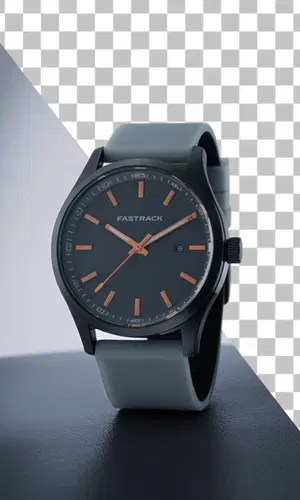
Gadget Product Background Removal

Human Background Removal

Headphone Background Removal
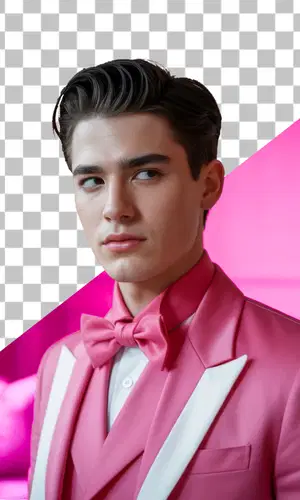
Portrait Background Removal

E-commerce Products Background Removal

Remove Product Backgrounds for E-commerce Success
Drop in a product photo, get a clean cutout on a transparent background. Works for everything from small jewelry to bulky electronics. Most e-commerce sellers use this to prep catalog images without hiring an editor.
Start Removing
Remove Photo Backgrounds with AI Precision
Upload a portrait photo and the AI detects where your subject ends and the background begins — including tricky areas like hair, scarves, and loose fabric. The transparent PNG gives you a clean starting point for composites, new backgrounds, or marketing assets.
Start RemovingWhat People Are Saying
Feedback from photographers, designers, and shop owners who use this daily.
Showing 6 of 3,958 reviews
"We photograph about 200 products a week and used to spend 20 minutes per image in Photoshop. Now it takes 10 seconds. The cutouts are clean enough that we rarely need to touch them up."
"I was skeptical about hair edges — they always look terrible with automatic tools. This one actually got it right on a curly-haired portrait. Not perfect on every shot, but way better than I expected."
"Clients send me photos on random backgrounds and want them on white. I used to dread cutout requests. Now I drag the image in, get a transparent PNG, and move on to the actual design work."
"I make YouTube thumbnails daily. The speed matters more than anything, and this is fast. Occasionally struggles with objects that blend into the background, but for people and distinct products it's solid."
"Our whole catalog team uses this. We went from outsourcing background removal to doing it in-house, which cut costs and turnaround time significantly."
"Fabric edges, jewelry, glassware — the kind of stuff that's hard to mask by hand. It handles most of it well. For complex glass objects I still tweak manually, but it's a great starting point."
Frequently Asked Questions
How well does it handle hair and fur?
Better than you'd expect. The AI is trained specifically on tricky edges — hair, fur, lace, tree branches — the kind of stuff that takes 20 minutes to mask manually in Photoshop. It's not flawless on every image, but for most photos it gets the edges right on the first try.
What format does the output come in?
Always PNG with a transparent background. You can also choose a solid fill color (white, gray, black) or a blurred background effect before processing. The transparent PNG is the most useful though — you can drop it into any design tool and put whatever background you want behind it.
Is it fast?
Usually under 10 seconds. Bigger files or complex scenes might take a little longer.
How much does it cost?
A free account comes with free credits. Each background removal costs 2 credits — about $0.06 to $0.13 depending on the pack. No subscription. Credits don't expire.
Can I use the cutout images for my store or business?
Yes. Since we're just removing the background from your own photo, you keep all rights to the result. People use this for product listings, e-commerce catalogs, professional headshots, marketing materials — anything.
How does this compare to Photoshop?
For speed and ease, it's way ahead — you get a clean cutout in under 10 seconds without touching a selection tool. Photoshop gives you more control if you need to fine-tune edges pixel by pixel, but honestly most people don't need that. For straightforward background removal, our AI saves a lot of time.
What if the result cuts off part of my subject?
This usually happens when the subject blends into the background (same colors, poor lighting). Try a photo with more contrast between your subject and background. If the photo is dark or blurry, the AI has a harder time figuring out where the edge is.
Does it work with group photos?
Yes — the AI detects and preserves all people or objects in the frame. It works fine with 2–3 people. Very crowded scenes with lots of overlapping figures are harder, but for a typical team photo or family portrait it does well.
What's the maximum file size?
We accept files up to 25MB. Most photos are well under that. If you're uploading a 4K or RAW image, it should still work fine.
Can I add a different background after removal?
Yes! That's the whole point of the transparent PNG. Use any design tool — Canva, Photoshop, GIMP, even online tools — to add your own background or leave it transparent. You can also use Drawever's built-in Edit feature to modify the result with a text prompt, or turn it into a 5-second video with AI audio.
What happens to my image after processing?
Deleted from our servers immediately after processing. We don't keep copies, we don't use your images for training, and we don't share them. Your privacy is protected.
Does it work on my phone?
Yes, fully responsive. Upload from your phone browser and download the result directly. Works great for mobile-first workflows.
Can I get a refund?
Unused credits are refundable within 30 days. If you're unsatisfied with a result, we can often reprocess with adjustments at no extra cost.
Do I need to create an account?
This tool needs a free account. Signing up takes under 30 seconds, no card is needed, and you get free credits to try it.
Is there anything to download or install?
Nothing to download, nothing to install. The tool runs entirely in your browser — on desktop or mobile. Open the page and start immediately.